

Over 3.4 billion deceptive emails flood user inboxes globally every single day, masquerading as tax authorities, delivery companies, banks, and streaming services. Recognizing critical phishing email red flags is your most vital personal defense against account hijacking, ransomware, and identity theft. In this forensic breakdown by Cauitonery, we guide you through the anatomy of modern social engineering attacks, how to inspect email headers, and how to verify messages before taking action.
🛡️ Key Phishing Takeaways
- Display Name Spoofing: Attackers configure sender names to read “PayPal Support” while the true address originates from an unrelated domain.
- Manufactured Panic: Phishing lures create false urgency (e.g., “Account suspended within 24 hours”) to force hasty emotional responses.
- Hyperlink Deception: Text that says “click here to verify” can link to an entirely different fraudulent domain. Always hover to inspect the URL.
- Attachment Payloads: Invoices ending in
.iso,.vbs, or password-protected archives contain stealthy malware droppers.
How Phishing Attacks Have Evolved
Gone are the days when phishing emails were recognizable solely by glaring spelling errors and broken grammar. Today, cybercrime syndicates utilize AI language models to generate grammatically flawless corporate communications that mimic the exact typography, logos, and legal disclaimers of major brands. Modern attackers also cross-reference leaked database records to personalize their attacks with your real name and phone number.
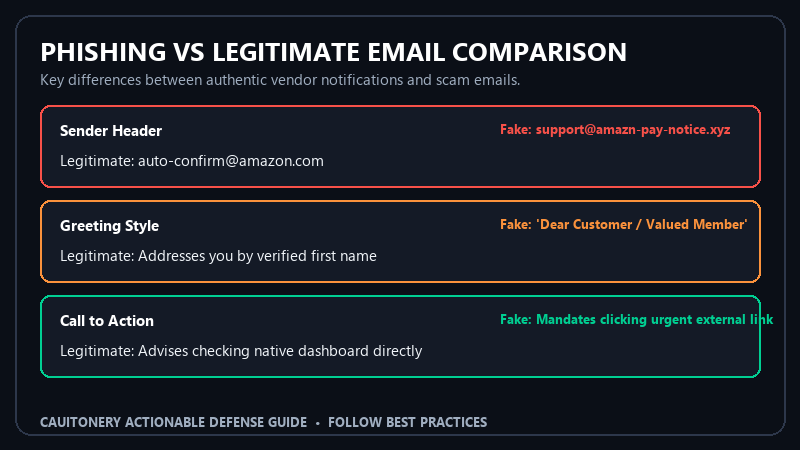
Phishing Red Flags Verification Matrix
Before clicking any link or downloading an attachment from an unexpected email, benchmark the communication against this verification matrix:
6 Critical Phishing Email Red Flags to Watch For
1. Mismatched Sender Address Behind the Display Name
Email clients display a friendly “Display Name” alongside the actual email address. Scammers set the display name to “Chase Bank Security” or “Netflix Account Support,” but expanding the full sender field reveals an unrelated address like service-update@mail-server-82.top. Always check the actual domain after the “@” sign. Knowing how to detect domain spoofing is just as important as identifying counterfeit websites before entering payment info.
2. Generic and Impersonal Salutations
Banks, streaming services, and utility companies address you by the legal first and last name registered on your account. If an email arrives addressing you as “Dear Customer,” “Valued Client,” or simply your email address (“Hello user@gmail.com”), treat it with immediate suspicion as one of the hallmark phishing email red flags.
3. False Urgency and Coercive Ultimatums
The primary weapon of social engineering is psychological pressure. Attackers know that if you pause and reflect, you will spot the fraud. Phishing lures rely on alarming triggers:
- “Your account will be permanently terminated within 24 hours.”
- “Unauthorized wire transfer of $1,450 detected—click here to cancel.”
- “Delivery failed: final notification before package return.”
4. Deceptive Hyperlinks and Link Shorteners
Never click on links embedded in unverified emails. On a desktop computer, hover your mouse cursor over the link button without clicking to reveal the true destination URL in your browser’s bottom status bar. On a touchscreen mobile device, long-press the link to preview the destination domain before proceeding. Beware of attacks that lead to social media impersonation scams that attempt to seize your personal profiles.
5. Requests for Sensitive Credentials or 2FA Codes
Legitimate institutions will never email you requesting your full Social Security number, banking PIN, password, or the 6-digit two-factor authentication code sent to your phone. Anyone asking for these credentials via email is an attacker attempting to compromise your account. The Federal Trade Commission (FTC) advice on phishing reminds consumers that no legitimate company will ever demand security codes over email.
6. Unsolicited Attachments with Obfuscated Extensions
Be extremely wary of unexpected email attachments purporting to be invoices, receipts, or shipping manifests. Attackers frequently use double extensions (e.g., invoice_receipt.pdf.exe) or compress malware inside zip or disk image files (.iso, .img) to bypass standard anti-virus scanners. Cybersecurity bulletins from the CISA Secure Our World campaign explicitly advise against opening unexpected attachments.
The 30-Second Verification Protocol
Whenever you receive an email demanding financial action or password resets, follow this simple protocol: Never click the link in the email. Instead, open a fresh browser tab, navigate directly to the vendor’s official website via your saved bookmarks, log into your account dashboard, and check the notification center for legitimate notices. If the matter is genuine, it will appear inside your authenticated web portal.
Frequently Asked Questions (FAQ)
What should I do if I clicked a phishing link?
If you clicked a link but did not enter any credentials, disconnect your device from the internet, run a full antivirus scan, and clear your browser cache. If you entered a password, navigate immediately to the real service on a separate device and change your password and revoke all active sessions.
Can opening a phishing email alone infect my computer?
Merely viewing a plain-text email will not compromise your device. However, modern HTML emails can load external tracking pixels. The true danger comes when you click embedded hyperlinks or download and execute malicious attachments.
How can I report phishing emails?
Most email providers have a built-in “Report Phishing” button. Forwarding malicious emails to the Anti-Phishing Working Group (APWG) at reportphishing@apwg.org and reporting them through official channels helps take rogue domains offline permanently.
Why do I still receive phishing emails despite spam filters?
Scammers constantly rotate newly registered domains, utilize compromised legitimate email servers, and leverage zero-day obfuscation techniques to slip through automated reputation filters. Recognizing phishing email red flags yourself remains your ultimate line of defense.
