

From internet-connected doorbell cameras and smart plugs to robotic vacuums and Wi-Fi thermostats, modern households now host dozens of intelligent connected gadgets. However, leaving these devices on your default home Wi-Fi creates wide-open pathways for cybercriminals to infiltrate your personal network. Implementing comprehensive smart home iot security measures ensures your connected lifestyle never compromises family privacy or home data safety. In this practical Cauitonery handbook, we show you how to isolate IoT gadgets, lock down router vulnerabilities, and prevent unauthorized remote camera snooping.
🛡️ Key IoT Defense Takeaways
- VLAN Network Isolation: Place all smart home devices onto a separate Guest Wi-Fi network or IoT VLAN to isolate them from personal computers.
- Disable UPnP Protocol: Turn off Universal Plug and Play (UPnP) on your home router to prevent rogue smart plugs from opening unsolicited inbound ports.
- Unique Appliance Credentials: Replace default factory passwords on every camera and smart hub with complex, unique passphrases.
- Firmware Maintenance: Enable automatic firmware updates to patch critical zero-day vulnerabilities discovered in smart devices.
Why Smart Home Devices Are Prime Targets for Hackers
Consumer IoT devices are notoriously engineered with tight hardware budgets, minimal onboard flash memory, and rushed software development cycles. Manufacturers frequently cut costs by omitting automatic security patch routines or hardcoding administrative backdoor credentials into their firmware.
When an attacker compromises a cheap smart lightbulb or off-brand security camera, they don’t just control the light—they use that compromised Linux microkernel as an internal jumping-off point to launch lateral attacks against your laptops, NAS storage drives, and smartphone backups on that same subnet. Prioritizing smart home iot security stops this lateral spread dead in its tracks.
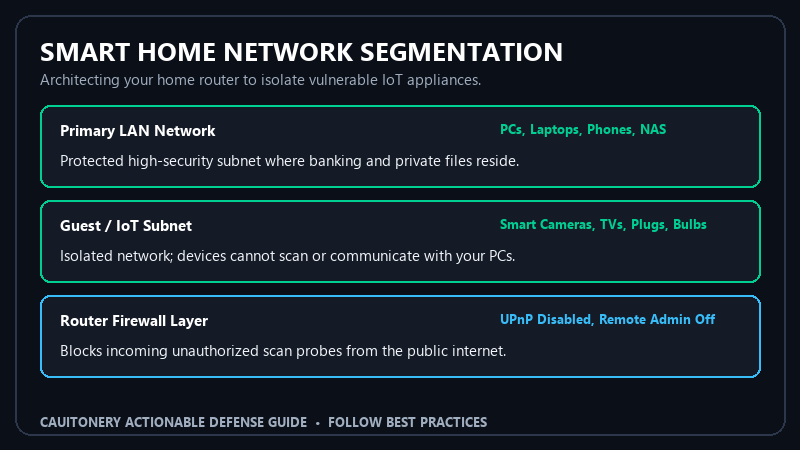
Smart Home IoT Security Checklist Matrix
Implement these preventative controls across your smart home ecosystem to eliminate unauthorized entry points:
5 Steps to Lock Down Smart Home Devices
1. Isolate IoT Devices on a Dedicated Guest Network
Log into your home router’s administrative control panel and enable the Guest Wi-Fi Network. Give it a distinct SSID and connect every smart TV, camera, smart speaker, and robot vacuum exclusively to this network. By turning on “AP Isolation,” devices on the guest network cannot communicate with your main PC, personal phone, or home file servers. Review our guide to Wi-Fi and router encryption protocols for foundational setup instructions.
2. Disable Universal Plug and Play (UPnP) on Your Router
UPnP was designed to make multiplayer gaming convenient by allowing local software to automatically open port forwarding rules on your router firewall. Unfortunately, malicious IoT firmware exploits UPnP to open external firewall ports without user authorization, leaving your camera streams accessible to the public internet.
3. Mandate Two-Factor Authentication on All Smart Ecosystems
Whether you manage your smart devices via Google Home, Apple Home, Amazon Alexa, or Ring, enable hardware or authenticator-based two-factor authentication (2FA). Consult our comprehensive guide on two-factor authentication for home accounts to eliminate credential stuffing attacks.
4. Disable Remote WAN Management on Your Router
Your router should only be configurable when you are physically connected to your local network. Open router settings and turn off “Remote Management,” “Web Access from WAN,” and “WPS (Wi-Fi Protected Setup).” Government security guidelines from the NIST Smart Home Cybersecurity Standards continually advise disabling external router access.
5. Choose Local-Control Protocols (Matter / Zigbee / Z-Wave)
Whenever possible, purchase smart sensors and switches that operate over local radio protocols like Zigbee, Z-Wave, or Matter over Thread rather than generic 2.4GHz Wi-Fi. Local protocols require a central hub and do not expose individual device IP addresses directly to the internet. Authoritative defense documentation from CISA IoT Hardening Guidelines advocates local-first architectures for sensitive home environments.
Frequently Asked Questions (FAQ)
Can a hacker watch me through my baby monitor or indoor camera?
If the camera utilizes default factory passwords, an unpatched firmware build, or an account without two-factor authentication, remote observers can potentially intercept the video feed. Always change the default password and activate 2FA.
Do smart bulbs really present a cyber risk?
Yes. While a smart bulb itself contains no personal files, it connects to your Wi-Fi router. If hacked, an attacker can use it as a persistent foothold on your internal network to sniff packets or infect other connected devices.
What should I do before throwing away or selling an old smart device?
Always perform a physical hardware factory reset (typically holding down a reset button for 10-15 seconds) to erase your saved Wi-Fi SSID credentials and remove the device from your mobile management app.
Why is smart home iot security crucial for modern households?
Because smart devices operate 24/7 in our private living spaces, proactive network segmentation and strong authentication ensure that the convenience of home automation never compromises family privacy.
