







If you have ever posted a complaint on social media about an airline delay, a locked crypto exchange account, or a delayed online delivery, you may have been targeted within minutes by a bot posing as customer support. Understanding the tactics of social media impersonation scams is critical to safeguard your personal credentials and financial assets. In this detailed exposé by Cauitonery, we analyze how counterfeit support handles operate, why victims fall into the trap, and how to verify legitimate platform accounts.
🛡️ Key Impersonation Takeaways
- Algorithmic Scraping: Fraud syndicates run bots that scrape keywords like “help,” “refund,” or “support” on Twitter/X, Instagram, and Facebook.
- Visual Spoofing: Scammers copy corporate logos, headers, and bios, subtly adding letters or underscores (e.g.,
@DeltaAir_Support). - Direct Message Pivot: Attackers immediately redirect victims into private direct messages (DMs) or Telegram to evade automated platform moderation.
- Account Hijacking Link: The impersonator sends a “verification link” that steals session cookies or prompts for 2FA one-time codes.
The Anatomy of an Impersonation Attack
Modern cybercriminals monitor public social media feeds using automated keyword listening algorithms. The moment a consumer tweets: “Hey @Airline, my flight was cancelled and I can’t reach customer service,” automated bots trigger instant notification alerts for the scam operator.
Within sixty seconds, an account named “Official Airline HelpDesk” replies: “Hello, we apologize for the disruption! Please send us a direct message so our senior agent can issue your instant refund.” Under stress and eagerness to resolve their issue, victims eagerly engage with social media impersonation scams, lowering their natural skepticism.

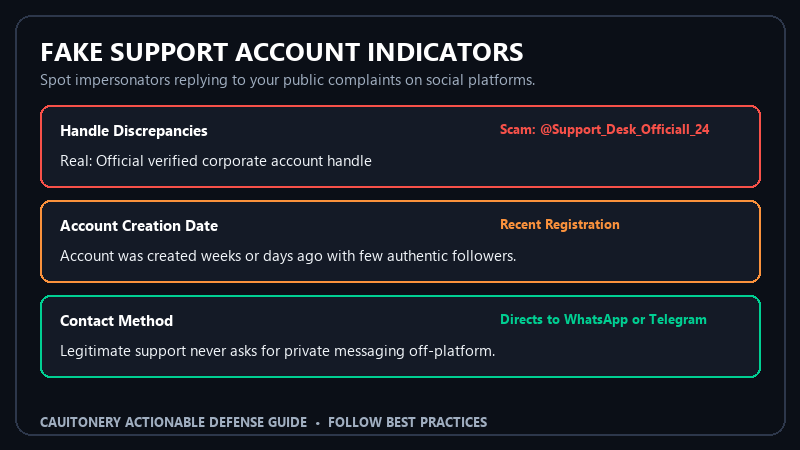
Social Media Support Account Verification Matrix
Use this verification scorecard to immediately determine whether a social media support account is genuine or a fraudulent clone:
| Profile Attribute | Legitimate Corporate Account | Impersonator Account | Risk Level |
|---|---|---|---|
| Handle Name (URL) | Exact official handle (e.g. @BankOfAmerica) |
Added characters (e.g. @BankOfAmerica_Care24) |
Critical Danger |
| Account Creation Date | Joined 8-15 years ago; hundreds of thousands of posts | Joined this month; only a few replies | High Red Flag |
| Verification Badge | Official Gold/Blue corporate badge tied to domain | No badge, or individual subscription badge | Moderate Warning |
| Support Communication | Directs user to formal ticket portal or hotline | Requests WhatsApp/Telegram or external link click | Confirmed Scam |
5 Red Flags of Social Media Impersonator Accounts
1. Subtle Handle Alterations and Extra Characters
Scammers cannot take the authentic handle @CoinbaseSupport, so they register typographical variations like @Coinbase_SupportHelp, @C0inbase_Care, or @Support_Coinbase_US. Always scrutinize the exact characters in the handle. These tactics closely parallel the email domain deception discussed in our guide to phishing email red flags.
2. The Paid Verification Badge Illusion
On modern social platforms, anyone can purchase a blue verification badge for a small monthly subscription. Do not assume a checkmark guarantees institutional authenticity. Always click on the badge to check the account classification; legitimate corporate accounts typically feature designated organization gold badges or verified corporate affiliations.
3. Redirecting You to Off-Platform Channels
A legitimate company will never ask you to message them on WhatsApp, Telegram, or call a Google Voice phone number to resolve an account dispute. Scammers use off-platform channels to bypass automated platform security bots and avoid leaving an audit trail.
4. Demanding Remote Screen Sharing or 2FA Tokens
Under the pretext of “troubleshooting,” impersonators may instruct you to download remote desktop utilities (like AnyDesk or TeamViewer) or paste a 6-digit confirmation code. If you surrender that code, they immediately execute account takeover. Always enforce hardware-based two-factor authentication to stop session hijacking in its tracks.
5. Demanding Upfront “Processing Fees” for Refunds
If an account claims you must pay a \$50 “refundable clearance fee” via Cash App, Zelle, or cryptocurrency before receiving your flight refund or insurance claim, you are dealing with an advance-fee fraudster. Real enterprises process refunds directly back to your original payment method.
How to Report and Safeguard Your Accounts
If you encounter an impersonator, do not engage in conversation. Report the profile immediately using the platform’s native “Report Impersonation” feature. Furthermore, report cyber fraud activity to the FBI Internet Crime Complaint Center (IC3) and submit a consumer report to the Federal Trade Commission Fraud Portal.
Frequently Asked Questions (FAQ)
Can a social media scammer hack my account just by messaging me?
No. Merely receiving or viewing a direct message will not compromise your account. The danger arises only if you click an external link, download a malicious file, or voluntarily disclose credentials and verification PINs.
Why don’t social media companies ban these bots instantly?
Scammers generate thousands of newly registered accounts daily using disposable proxy IPs and automated scripts. While security teams ban thousands of accounts hourly, human vigilance remains vital.
What should I do if I shared my login info with an impersonator?
Log in immediately from an official browser window, change your password, click “Log out of all other devices” in your security settings, and contact the official platform support through their authentic website.
How can I verify a real brand on social media?
Never search for customer support accounts within the social media search bar. Always navigate to the company’s verified website (e.g., delta.com or paypal.com) and click the social media icons in their official website footer to reach their genuine profile.


